
[]()
**Note: This is a work-in-progress prototype, please treat it as such. Pull requests are welcome! You can get your feet wet with [good first issues]( “good first issues” )**
An easy-to-use library for emulating code in minidump files. Here are some links to posts/videos using dumpulator:
* Introduction video with [OALabs]( “OALabs” ): [Dumpulator – Using Binary ]( “Dumpulator – Using Binary” )[Emulation]( “Emulation” ) To Automate Reverse Engineering
* [Emulating malware with Dumpulator]( “Emulating malware with Dumpulator” )
* [Emotet x64 Stack Strings Config Emulation | OALABS Research]( “Emotet x64 Stack Strings Config Emulation | OALABS Research” )
* [Native function and Assembly Code Invocation]( “Native function and Assembly Code Invocation” )
* [Guloader string ]( “Guloader string” )[decryption]( “decryption” ) (VEH)
## Examples
### Calling a function
The example below opens `StringEncryptionFun_x64.dmp` (download a copy [here]( “here” )), allocates some memory and calls the decryption function at `0x140001000` to decrypt the string at `0x140017000`:
from dumpulator import Dumpulator
dp = Dumpulator(“StringEncryptionFun_x64.dmp”)
temp_addr = dp.allocate(256)
dp.call(0x140001000, [temp_addr, 0x140017000])
decrypted = dp.read_str(temp_addr)
print(f”decrypted: ‘{decrypted}'”)
The `StringEncryptionFun_x64.dmp` is collected at the entry point of the `tests/StringEncryptionFun` example. You can get the compiled binaries for `StringEncryptionFun` [here]( “here” )
### Tracing execution
from dumpulator import Dumpulator
dp = Dumpulator(“StringEncryptionFun_x64.dmp”, trace=True)
dp.start(dp.regs.rip)
This will create `StringEncryptionFun_x64.dmp.trace` with a list of instructions executed and some helpful indications when switching modules etc. Note that tracing _significantly_ slows down emulation and it’s mostly meant for debugging.
### Reading utf-16 strings
from dumpulator import Dumpulator
dp = Dumpulator(“my.dmp”)
buf = dp.call(0x140001000)
dp.read_str(buf, encoding=’utf-16′)
### Running a snippet of code
Say you have the following function:
00007FFFC81C06C0 | mov qword ptr [rsp+0x10],rbx ; prolog_start
00007FFFC81C06C5 | mov qword ptr [rsp+0x18],rsi
00007FFFC81C06CA | push rbp
00007FFFC81C06CB | push rdi
00007FFFC81C06CC | push r14
00007FFFC81C06CE | lea rbp,qword ptr [rsp-0x100]
00007FFFC81C06D6 | sub rsp,0x200 ; prolog_end
00007FFFC81C06DD | mov rax,qword ptr [0x7FFFC8272510]
You only want to execute the prolog and set up some registers:
from dumpulator import Dumpulator
prolog_start = 0x00007FFFC81C06C0
# we want to stop the instruction after the prolog
prolog_end = 0x00007FFFC81C06D6 + 7
dp = Dumpulator(“my.dmp”, quiet=True)
dp.regs.rcx = 0x1337
dp.start(start=prolog_start, end=prolog_end)
print(f”rsp: {hex(dp.regs.rsp)}”)
The `quiet` flag suppresses the logs about DLLs loaded and memory regions set up (for use in scripts where you want to reduce log spam).
### Custom syscall implementation
You can (re)implement syscalls by using the `@syscall` decorator:
from dumpulator import *
from dumpulator.native import *
from dumpulator.handles import *
from dumpulator.memory import *
@syscall
def ZwQueryVolumeInformationFile(dp: Dumpulator,
FileHandle: HANDLE,
IoStatusBlock: P[IO_STATUS_BLOCK],
FsInformation: PVOID,
Length: ULONG,
FsInformationClass: FSINFOCLASS
):
return STATUS_NOT_IMPLEMENTED
All the syscall function prototypes can be found in [ntsyscalls.py]( “ntsyscalls.py” ). There are also a lot of examples there on how to use the API.
To hook an existing syscall implementation you can do the following:
import dumpulator.ntsyscalls as ntsyscalls
@syscall
def ZwOpenProcess(dp: Dumpulator,
ProcessHandle: Annotated[P[HANDLE], SAL(“_Out_”)],
DesiredAccess: Annotated[ACCESS_MASK, SAL(“_In_”)],
ObjectAttributes: Annotated[P[OBJECT_ATTRIBUTES], SAL(“_In_”)],
ClientId: Annotated[P[CLIENT_ID], SAL(“_In_opt_”)]
):
process_id = ClientId.read_ptr()
assert process_id == dp.parent_process_id
ProcessHandle.write_ptr(0x1337)
return STATUS_SUCCESS
@syscall
def ZwQueryInformationProcess(dp: Dumpulator,
ProcessHandle: Annotated[HANDLE, SAL(“_In_”)],
ProcessInformationClass: Annotated[PROCESSINFOCLASS, SAL(“_In_”)],
ProcessInformation: Annotated[PVOID, SAL(“_Out_wri tes_bytes_(ProcessInformationLength)”)],
ProcessInformationLength: Annotated[ULONG, SAL(“_In_”)],
ReturnLength: Annotated[P[ULONG], SAL(“_Out_opt_”)]
):
if ProcessInformationClass == PROCESSINFOCLASS.ProcessImageFileNameWin32:
if ProcessHandle == dp.NtCurrentProcess():
main_module = dp.modules[dp.modules.main]
image_path = main_module.path
elif ProcessHandle == 0x1337:
image_path = R”C:Windowsexplorer.exe”
else:
raise NotImplementedError()
buffer = UNICODE_STRING.create_buffer(image_path, ProcessInformation)
assert ProcessInformationLength >= len(buffer)
if ReturnLength.ptr:
dp.write_ulong(ReturnLength.ptr, len(buffer))
ProcessInformation.write(buffer)
return STATUS_SUCCESS
return ntsyscal ls.ZwQueryInformationProcess(dp,
ProcessHandle,
ProcessInformationClass,
ProcessInformation,
ProcessInformationLength,
ReturnLength
)
### Custom structures
Since `v0.2.0` there is support for easily declaring your own structures:
from dumpulator.native import *
class PROCESS_BASIC_INFORMATION(Struct):
ExitStatus: ULONG
PebBaseAddress: PVOID
AffinityMask: KAFFINITY
BasePriority: KPRIORITY
UniqueProcessId: ULONG_PTR
InheritedFromUniqueProcessId: ULONG_PTR
To instantiate these structures you have to use a `Dumpulator` instance:
pbi = PROCESS_BASIC_INFORMATION(dp)
assert ProcessInformationLength == Struct.sizeof(pbi)
pbi.ExitStatus = 259 # STILL_ACTIVE
pbi.PebBaseAddress = dp.peb
pbi.AffinityMask = 0xFFFF
pbi.BasePriority = 8
pbi.UniqueProcessId = dp.process_id
pbi.InheritedFromUniqueProcessId = dp.parent_process_id
ProcessInformation.write(bytes(pbi))
if ReturnLength.ptr:
dp.write_ulong(ReturnLength.ptr, Struct.sizeof(pbi))
return STATUS_SUCCESS
If you pass a pointer value as a second argument the structure will be read from memory. You can declare pointers with `myptr: P[MY_STRUCT]` and dereferences them with `myptr[0]`.
## Collecting the dump
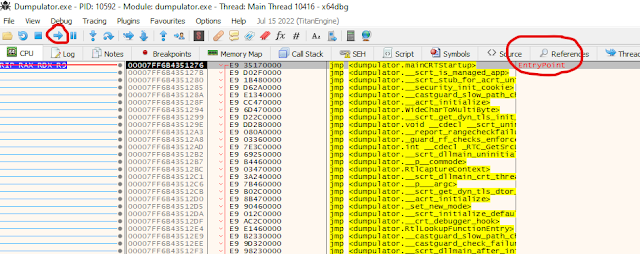
~~There is a simple [x64dbg]( “x64dbg” ) plugin available called [MiniDumpPlugin]( “MiniDumpPlugin” )~~ The [minidump]( “minidump” ) command has been integrated into x64dbg since 2022-10-10. To create a dump, pause execution and execute the command `MiniDump my.dmp`.
## Installation
From [PyPI]( “PyPI” ) (latest [release]( “release” )):
python -m pip install dumpulator
To install from source:
python setup.py install
Install for a development environment:
python setup.py develop
## Related work
* [Dumpulator-IDA]( “Dumpulator-IDA” ): This project is a small POC plugin for launching dumpulator emulation within IDA, passing it addresses from your IDA view using the context menu.
* [wtf]( “wtf” ): Distributed, code-coverage guided, customizable, cross-platform snapshot-based fuzzer designed for attacking user and / or kernel-mode targets running on [Microsoft]( “Microsoft” ) Windows
* [speakeasy]( “speakeasy” ): Windows sandbox on top of unicorn.
* [qiling]( “qiling” ): Binary emulation framework on top of unicorn.
* [Simpleator]( “Simpleator” ): User-mode application emulator based on the Hyper-V Platform API.
What sets dumpulator apart from sandboxes like [speakeasy]( “speakeasy” ) and qiling is that the full process memory is available. This improves [performance]( “performance” ) because you can emulate large parts of malware without ever leaving unicorn. Additionally only syscalls have to be emulated to provide a realistic Windows environment (since everything actually _is_ a legitimate process environment).
## Credits
* [herrcore]( “herrcore” ) for inspiring me to make this
* [secret club]( “secret club” )
* [JetBrains]( “JetBrains” ) for free PyCharm license!
* [Image by GraphiqaStock]( “Image by GraphiqaStock” ) on Freepik
**[Download Dumpulator]( “Download Dumpulator” )**Read More
References

Back to Main

