


[]()
Recon is one of the most important phases that seem easy but takes a lot of effort and skill to do right. One needs to know about the right tools, correct queries/syntax, run those queries, correlate the information, and sanitize the output. All of this might be easy for a seasoned infosec/recon professional to do, but for rest, it is still near to magic. How cool it will be to ask a simple question like “Find me an open Memcached server in Singapore with UDP support?” or “How many IP cameras in Singapore are using default credentials?” in a chat and get the answer?
The integration of GPT-3, deep learning-based language models to produce human-like text, with well-known recon tools like Shodan, is the foundation of ReconPal. ReconPal also supports using voice commands to execute popular [exploits]( “exploits” ) and perform reconnaissance.
## Built With
* OpenAI GPT-3
* Shodan API
* Speech-to-Text
* Telegram Bot
* Docker Containers
* Python 3
# Getting Started
To get ReconPal up and running, follow these simple steps.
### Prerequisites
* Telegram Bot Token Use BotFather and create a new [telegram]( “telegram” ) bot. Refer to the documentation at
* Shodan API:
Create a shodan Account and create a new API Key from
* Google Speech-to-Text API:
Enable Speech-to-Text in GCP and get the credentials. Refer to these steps from the documentation
* OpenAI API Key:
Create a free openAI account to try out the API.
* Docker
sudo apt-get updates?
sudo apt-get install docker.io?
sudo curl -L “https://github.com/docker/compose/releases/download/1.26.0/docker-compose-$(uname -s)-$(uname -m)” -o? /usr/local/bin/docker-compose?
chmod +x /usr/local/bin/docker-compose
### Installation
1. Clone the repo
git clone https://github.com/pentesteracademy/reconpal.git
2. Enter your OPENAI, SHODAN API keys, and TELEGRAM bot token in `docker-compose.yml`
OPENAI_API_KEY=
SHODAN_API_KEY=
TELEGRAM_BOT_TOKEN=
3. Start reconpal
docker-compose up
# Usage
Open the telegram app and select the created bot to use ReconPal.
1. Click on start or just type in the input box.
/start
2. Register the model.
/register
3. Test the tool with some commands.
scan 10.0.0.8
# Tool featured at
* Blackhat Asia Arsenal 2022
* Demonstration Video
# Contributors
Jeswin Mathai, Senior Security Researcher, INE [email protected]
Nishant Sharma, Security [Research]( “Research” ) Manager, INE [email protected]
Shantanu Kale, Cloud Developer, INE [email protected]
Sherin Stephen, Cloud Developer, INE [email protected]
Sarthak Saini (Ex-Pentester Academy)
# Documentation
For more details, refer to the “ReconPal.pdf” PDF file. This file contains the slide deck used for presentations.
# Screenshots
Starting reconpal and registering model
[]( “ReconPal: Leveraging NLP for Infosec (15)” )[]()
Finder module in action
[]( “ReconPal: Leveraging NLP for Infosec (16)” )[]()
Scanner module in action
[]( “ReconPal: Leveraging NLP for Infosec (17)” )[]()
Attacker module in action
[]( “ReconPal: Leveraging NLP for Infosec (18)” )[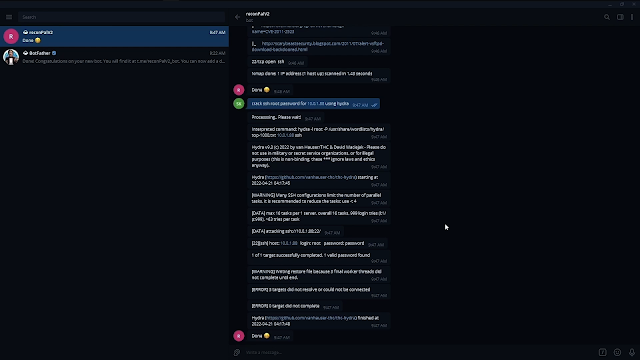]()
Voice Support
[]( “ReconPal: Leveraging NLP for Infosec (19)” )[]()
# License
This program is free software: you can redistribute it and/or modify it under the terms of the GNU General Public License v2 as published by the Free Software Foundation.
This program is [distributed]( “distributed” ) in the hope that it will be useful, but WITHOUT ANY WARRANTY; without even the implied warranty of MERCHANTABILITY or FITNESS FOR A PARTICULAR PURPOSE. See the GNU General Public License for more details.
You should have received a copy of the GNU General Public License along with this program. If not, see [http://www.gnu.org/licenses/]( “http://www.gnu.org/licenses/” ).
**[Download Reconpal]( “Download Reconpal” )**Read More